How To Use ChatGPT: A Practical Guide To Getting Real Value From AI


If you’re looking into how to use ChatGPT, you probably already sense that it can do a lot. The challenge isn’t access – it’s knowing how to turn those capabilities into something that actually helps you day to day. Many people try it once, get a decent answer, and then move on. That’s not because the tool falls short, but because they haven’t learned how to work with it properly.
This guide is designed to help you move beyond curiosity and into confident, everyday use. Rather than overwhelming you upfront, we’ll build understanding step by step. Along the way, you’ll see how ChatGPT actually fits into real workflows and how to avoid the most common mistakes people make when using AI.

What is ChatGPT
Before diving into tactics, it helps to understand what ChatGPT actually does. Otherwise, expectations can easily drift in the wrong direction.
At a basic level, ChatGPT is an AI chatbot built on a large language model that generates text by identifying patterns in large volumes of written data. It doesn’t “think” or “know” things the way humans do. Instead, it predicts likely responses based on language patterns, which is why its answers sound confident even when they aren’t always correct.
Because of that, ChatGPT is excellent at tasks involving language. For example, it can explain concepts, draft content, summarize long documents, brainstorm ideas, or rewrite text in different tones. On the other hand, it is not a search engine, a database of real-time facts, or a replacement for human judgment.
It’s also worth noting that ChatGPT comes in different versions depending on the model you’re using. Newer models tend to handle nuance better, follow instructions more closely, and generate more reliable output. Even so, no version is perfect. Therefore, accuracy still depends heavily on how you interact with it.
In short, ChatGPT is best seen as a productivity tool – not an authority. When you treat it as a collaborator rather than an oracle, the results improve dramatically.
Getting started: Accounts, access, and first impressions
Getting started with ChatGPT is fairly straightforward. Still, a few early choices can shape your experience more than you might expect.
First, you’ll need an account through OpenAI’s platform or a product that integrates ChatGPT directly. Most people begin with the web interface, although mobile apps are also available. Once logged in, you’ll see a simple chat-style interface with a text input box at the bottom.
At first glance, this simplicity can feel almost underwhelming. However, that blank input field is where all the power lives. Everything depends on what you type – and how you follow up.
Before sending your first message, take a moment to explore the settings. Depending on your access level, you may be able to adjust preferences like response length, tone, or data usage.
When you’re ready, ask a clear, simple question. Then read the response carefully, not just for correctness but for structure and tone. This early attention helps you learn how the AI “responds” to different styles of input.
Step-by-step: Using ChatGPT effectively from the start
Once you’re comfortable with the interface, it’s time to focus on practical usage. This is where many people ask again about how to use ChatGPT in a way that actually saves time instead of creating more work.
Step 1: Be clear about your goal
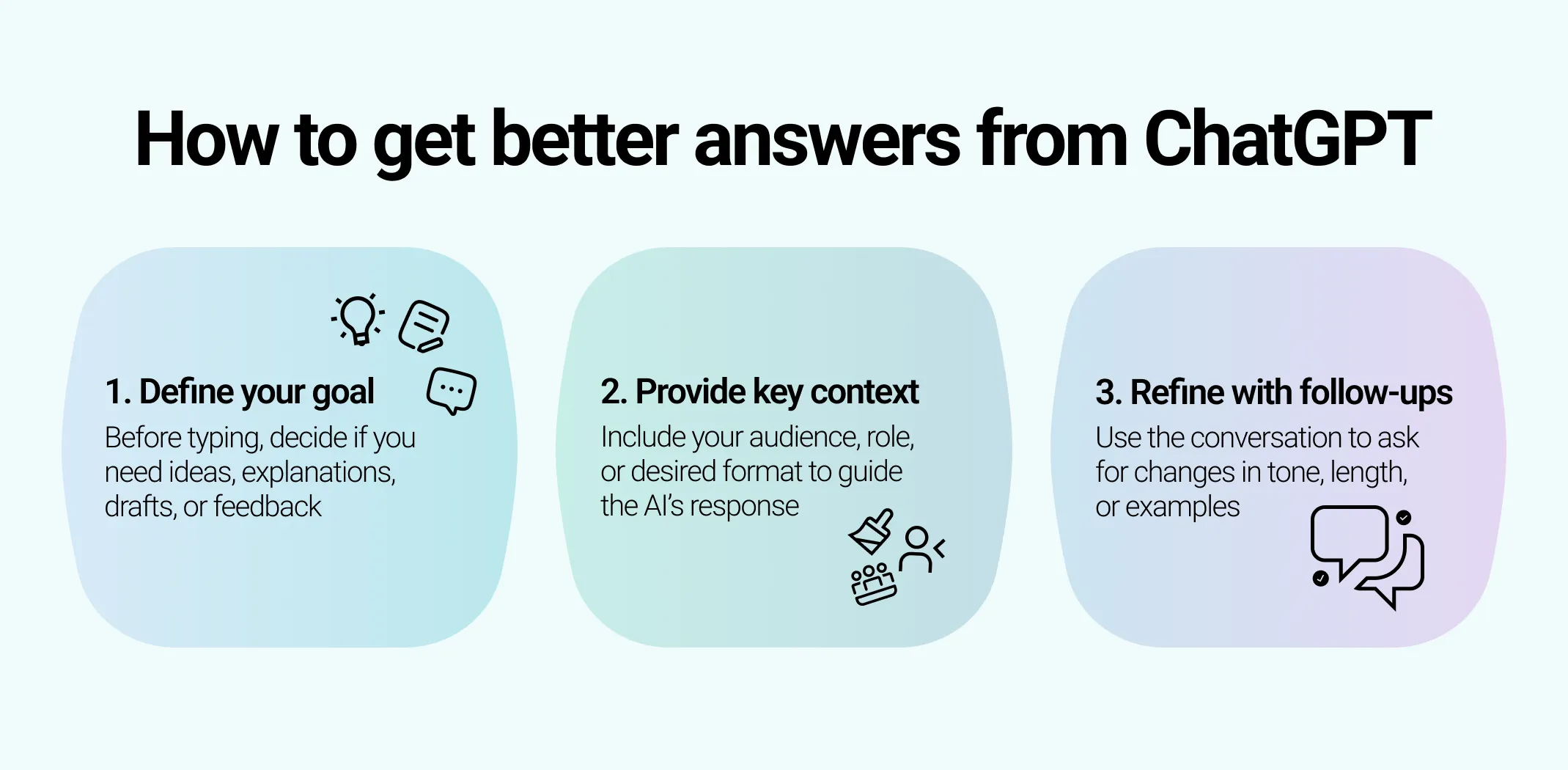
Before typing anything, pause and decide what you want. Are you looking for ideas, explanations, drafts, or feedback? When you know the goal, your prompt becomes sharper. As a result, the response improves.
For example, “Explain SEO” is vague. Meanwhile, “Explain SEO to a beginner in simple language using examples” gives direction.
Step 2: Add context early
ChatGPT performs better when it understands the situation. Therefore, include relevant background in your first message whenever possible. This might involve your role, your audience, or the format you need.
Instead of correcting the output later, front-load your expectations. That way, you reduce unnecessary back-and-forth.
Step 3: Read, then refine
Rarely is the first answer perfect. However, that’s not a failure – it’s part of the process. Use follow-up prompts to refine the response. For instance, you might ask for a shorter version, a different tone, or clearer examples.
Because ChatGPT remembers the conversation context, each follow-up builds on the last one. Over time, this back-and-forth feels more like collaboration than command.
Step 4: Save what works
When you get a strong result, don’t lose it. Save prompts that work well, especially for repeated tasks. In the long run, these prompt “templates” become one of the most valuable parts of your workflow.
Practical use cases: How people actually leverage ChatGPT
Once you get past the basics, the real value of ChatGPT shows up in how consistently you use it. Below are expanded examples that show how different groups apply ChatGPT in real-world situations.
For students and lifelong learners
ChatGPT works especially well as a learning companion. Instead of replacing study, it helps remove friction when something doesn’t make sense right away.
Students often use it to:
- Break down complex topics into simpler explanations
- Rephrase academic content in clearer language
- Create study guides or revision summaries
- Generate practice questions to test understanding
For example, if a concept feels overwhelming, you can ask ChatGPT to explain it “as if I’m new to this” or “using a real-world analogy.” Because you can keep asking follow-up questions, learning becomes more interactive.
For professionals and knowledge workers
In professional settings, ChatGPT is most effective for tasks that require structured thinking or written communication. It’s often used to speed up work that would otherwise interrupt focus.
Common professional use cases include:
- Drafting emails, reports, and proposals
- Summarizing long documents or meeting notes
- Preparing talking points or agendas
- Rewriting content to match a specific tone or audience
Instead of starting from a blank page, professionals use ChatGPT to create a rough draft and then refine it. This approach shortens turnaround time while keeping control in human hands. As a result, the tool acts more like a writing assistant than an automated replacement.
For creators, writers, and marketers
For people who work with content, ChatGPT is often used earlier in the creative process. While it won’t replace original thinking, it can help generate momentum.
Creators commonly use ChatGPT to:
- Brainstorm content ideas or angles
- Outline articles, videos, or campaigns
- Rewrite content for different platforms
- Improve clarity or flow in existing drafts
When creative energy is low, ChatGPT can provide a starting point. From there, creators adjust, refine, and inject their own voice. Because of this, the tool supports creativity rather than diluting it – when used intentionally.
For businesses and teams
In business environments, ChatGPT is frequently used to standardize and speed up communication. This is especially useful for teams that handle repetitive written tasks.
Business-focused use cases include:
- Drafting customer support responses
- Creating internal documentation or FAQs
- Writing onboarding materials
- Summarizing feedback or survey responses
By handling first drafts or repetitive text, ChatGPT frees up team members to focus on higher-level decisions. However, successful teams still review and adapt outputs to match their brand voice and policies.
For personal productivity and everyday tasks
Beyond work and study, ChatGPT is also useful for personal organization. These smaller use cases often add up over time.
People use it to:
- Plan trips or schedules
- Create checklists and routines
- Draft personal messages
- Think through decisions by listing pros and cons
While these tasks may seem minor, they reduce mental load. Over time, that reduction makes daily planning feel more manageable.
Prompting strategies: How to get better results
Getting useful output from ChatGPT isn’t about clever phrasing – it’s about clarity and structure. Once you understand how the model responds to instructions, you can guide it far more effectively. Below are strategies on how to use ChatGPT to create content, plan campaigns, and handle customer communication.
Start with clear, direct instructions
The most reliable prompts are plain and intentional. Instead of trying to sound natural or conversational, focus on being explicit about what you want. ChatGPT responds best when the task, format, and goal are clearly stated.
For example, telling it what to produce and how to present it in the same prompt reduces guesswork. As a result, the response is more aligned with your expectations from the start.
Provide context before asking the question
Context significantly improves accuracy. When ChatGPT understands the situation surrounding your request, it can tailor its response more precisely.
This might include:
- Who the content is for
- Why you need it
- Where or how it will be used
Placing this information at the beginning of your prompt helps the model prioritize relevant details. Otherwise, you may need several follow-up messages to correct direction.
Assign a role or perspective
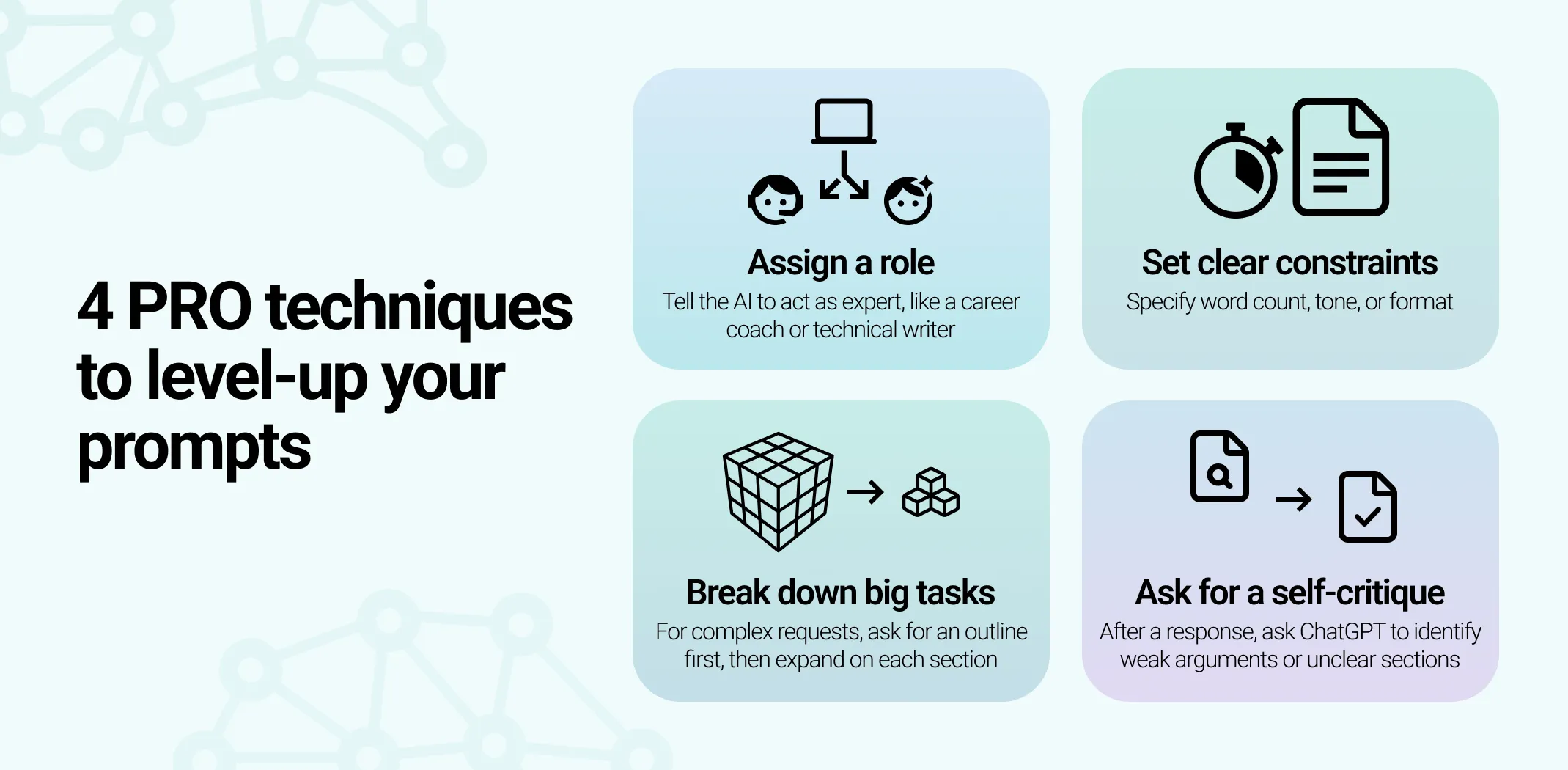
One of the most effective prompting techniques is role assignment. By telling ChatGPT to “act as” a specific type of expert, you influence tone, structure, and depth.
For instance, asking it to respond as a “career coach” will produce different guidance than asking it to respond as a “technical recruiter.” This approach works especially well for advice, reviews, and explanations.
Use constraints to shape the output
Constraints give structure to responses. Without them, ChatGPT tends to default to generic explanations.
Useful constraints include:
- Word or sentence limits
- Reading level or tone (e.g., simple, professional, conversational)
- Formatting instructions (bullet points, tables, numbered steps)
By narrowing the range of acceptable answers, you make it easier for the model to meet your needs.
Break complex tasks into smaller prompts
When a request is large or multi-layered, avoid asking for everything at once. Instead, split the task into steps.
For example, you might first ask for an outline, then expand each section separately. This approach improves focus and gives you more control over the final result. It also reduces the chance of missing key details.
Use examples to guide the style
If you want a specific tone or format, showing an example often works better than describing it. You can paste a short sample and ask ChatGPT to follow the same style.
This technique is especially helpful when writing content that needs to match an existing brand voice or writing standard.
Ask for multiple options
Rather than settling for the first response, ask for alternatives. Requesting two or three variations encourages diversity in phrasing and ideas.
This is particularly useful for:
- Headlines
- Calls to action
- Opening paragraphs
Comparing options helps you spot patterns and choose the strongest direction.
Refine instead of restarting
If an answer isn’t quite right, don’t discard it. Point out what needs adjusting and ask ChatGPT to revise.
For example, you can ask it to:
- Simplify the language
- Remove repetition
- Focus more on a specific point
Because the model remembers previous context, refinement is usually faster and more accurate than starting from scratch.
Ask ChatGPT to critique its own output
A less obvious but powerful technique is self-review. After receiving a response, you can ask ChatGPT to evaluate its own work.
This works well for:
- Identifying unclear sections
- Spotting weak arguments
- Improving structure or flow
While it’s not a substitute for human judgment, it often highlights issues worth addressing.
Know when to stop prompting
Finally, it’s important to recognize when further prompting won’t improve the result. At some point, manual editing is faster and more precise.
ChatGPT is a drafting and thinking tool, not a finishing tool. The best outcomes come from combining thoughtful prompts with human review.
How to stay accurate with ChatGPT
Once ChatGPT becomes part of your routine, a few advanced habits can make a noticeable difference.
First, always verify important information. ChatGPT can sound confident even when it’s wrong. Therefore, double-check facts, especially in technical or legal contexts.
Second, be mindful of sensitive data. Avoid sharing private or confidential information unless you fully understand how data is handled.
Third, combine ChatGPT with other tools. For example, you might draft text in ChatGPT and then refine it in your preferred editor or project management tool. This layered approach often produces better results than relying on a single platform.
Finally, review your past conversations. They’re a goldmine for learning what works and what doesn’t.
Once you’re comfortable with these best practices, the next question becomes practical: where does ChatGPT create the most impact? For many people, the answer is ecommerce.
How to use ChatGPT for ecommerce and dropshipping
Running an online store involves constant writing, planning, and decision-making – exactly the areas where AI tools perform best. Understanding how to use ChatGPT in these scenarios turns it from a general assistant into a real business asset.
Product research and idea validation
ChatGPT can support early-stage product research by helping you explore niches, customer needs, and positioning ideas. While it won’t replace real market data, it’s useful for narrowing down directions before you invest time or money.
For example, you can ask it to:
- Analyze customer pain points in a niche
- Compare product categories based on trends
- Suggest angles for positioning similar products
Prompt examples:
Compare the dropshipping potential of reusable water bottles versus bamboo toothbrushes in 2025. Highlight trends and customer interest.
Suggest 10 unique angles for marketing a fitness smartwatch to busy professionals.
This is often faster than starting from scratch and gives you a clearer starting point.
Product descriptions and store content
Writing product descriptions is one of the most time-consuming parts of dropshipping. ChatGPT can generate first drafts that highlight benefits, not just features.
You can use it to:
- Rewrite supplier descriptions in original language
- Adjust tone for different audiences
- Create variations for testing
Prompt example:
Rewrite this supplier description for a portable blender in a friendly, engaging tone aimed at college students: [paste description].
The key is to treat the output as a draft. Review it, adjust it to your brand voice, and double-check claims before publishing.
Marketing copy and ads
ChatGPT is also helpful when creating marketing content. From ad copy to email campaigns, it can speed up ideation and reduce creative fatigue.
Common use cases include:
- Writing ad headlines and captions
- Drafting promotional emails
- Generating social media post ideas
Prompt examples:
Write 5 catchy Instagram captions for a new line of eco-friendly backpacks.
Draft a promotional email for a weekend flash sale on home office products.
Generate 10 social media post ideas to promote a new skincare product launch.
Instead of guessing what to say, you start with options and refine from there.
Customer support and communication
For store owners handling customer messages, ChatGPT can help draft clear, polite responses. This is especially useful for common questions about shipping, returns, or order updates.
Prompt examples:
Write a polite reply to a customer asking why their order hasn’t arrived yet. Include an apology and estimated delivery time.
Draft a response to a customer requesting a refund for a damaged product, keeping a professional and friendly tone.
Create a template to answer frequently asked questions about shipping and returns for my ecommerce store.
While it shouldn’t fully automate support, it can reduce response time and improve consistency.
Planning and strategy
Beyond content, ChatGPT works well as a thinking partner. You can use it to outline marketing plans, brainstorm growth ideas, or break down complex tasks into steps.
Prompt example:
Outline a 3-month marketing plan for a new dropshipping store selling kitchen gadgets.
In other words, ChatGPT supports the thinking side of ecommerce, not just the writing.
Ecommerce, SEO & marketing ChatGPT prompts (copy‑paste ready)
Below are real‑world prompts designed to influence ChatGPT to think like an expert strategist. These prompts include role directions, desired outputs, context, and formatting requirements so you get useful, ready‑to‑apply responses every time.
Prompt: You are an ecommerce SEO specialist with deep experience writing high‑converting product pages. For the following product, generate SEO‑friendly title tags (50–60 characters) and meta descriptions (140–160 characters) that include the primary keyword and address user intent: Make sure: Prompt: You are an SEO content strategist. Create a detailed blog post outline targeting the keyword [Target Keyword]. Your outline must include: Audience: [Describe target audience] Prompt: Act as an ecommerce SEO writer. Produce a 500–700 word category page content for [Category Name] selling [Product Type]. Include: Target audience: [Describe audience, e.g., first‑time buyers] Prompt: You’re a keyword research expert. Given this list of seed keywords: [paste list of keywords], classify them by search intent (informational, navigational, transactional) and then sort them by funnel stage (top, middle, bottom). Return the results in a table format with columns: | Keyword | Intent | Funnel Stage | Suggested Page Type | Also include a short explanation of why each keyword fits its intent category. Prompt: You are an SEO content strategist with expertise in ecommerce. Brainstorm 10 blog post ideas for an ecommerce brand that sells [product or category]. For each idea, include: Previous best‑performing content (if any): [list titles] Prompt: You are a senior ecommerce email marketer. Create a 5‑email sequence to support the launch of [product name] to the email list. Each email should include: Target audience: [describe audience] Make the sequence flow logically from awareness to conversion. Prompt: You are an SEO analyst. For the following competitors: [list competitor URLs] and the target page: [your URL], perform a gap analysis. Look for: Return: Prompt: You’re a digital marketing strategist. Create a 7‑day marketing plan for the ecommerce brand [brand name] focusing on: Target audience: [description] Deliver the plan as a day‑by‑day schedule with tasks and expected metrics. Prompt: You’re a marketing analyst. Given the following data from Google Analytics/Search Console (paste data or paste key metrics), provide: Deliver the summary in plain, business‑ready language. To get the best results, always include: These elements tell ChatGPT not only what to write, but how to think – which dramatically improves quality.
1. Ecommerce product page optimization
2. SEO blog outline tailored for target keyword
Competitors to surpass: [List competitor URLs or titles]
Provide the final outline in ordered list format with brief explanations under each heading.3. Ecommerce category page content
4. Keyword research & intent categorization
5. Blog topic & content idea brainstorm (ecommerce focused)
Target audience: [describe]6. Marketing email sequence for ecommerce launch
Product value props: [list 2–3 selling points]
Tone: [friendly/professional/casual/etc.]7. Competitor SEO gap analysis
8. Weekly marketing plan (channels + KPIs)
Budget: [e.g., $500/week]Bonus: KPI reporting prompt
Best practices when using these prompts
AliDropship: An AI-powered, done-for-you ecommerce solution
Using ChatGPT is powerful, but managing multiple tools, platforms, and workflows can quickly become overwhelming – especially if you’re new to ecommerce. That’s where AliDropship offers a different approach.
Instead of building everything from scratch, AliDropship provides a fully built, AI-powered dropshipping business that’s ready to sell from day one.
Plug-and-play store setup
With AliDropship, you don’t need to worry about design, coding, or technical setup. Each store is professionally built based on current ecommerce best practices.
This includes:
- Optimized layouts
- Ready-to-use product pages
- Basic SEO structure already in place
What normally takes days or even weeks can be ready in hours. As a result, beginners can focus on learning and growth instead of getting stuck in setup details.
Preloaded, high-demand products
AliDropship stores don’t start empty. They come preloaded with carefully selected products from popular niches like fashion, footwear, tech accessories, and more.
Products are sourced from authorized suppliers, including well-known brands. This saves time on product research and helps build trust with customers from the start.
Instead of guessing what might sell, you begin with products that already have demand.
Built-in AI automation
Running a store involves many repetitive tasks. AliDropship’s AI handles much of this in the background, so you don’t need extra apps or constant monitoring.
Automation covers areas like:
- Order fulfillment
- Inventory updates
- Price syncing
- Customer notifications
This setup reduces errors and frees up your time for marketing and strategy.
AI-powered automated promotions
One of AliDropship’s strongest features is its fully automated promotion system. Rather than manually setting up ads across different platforms, the AI manages campaigns for you.
Promotions run across:
- Amazon
- Google Shopping
- Facebook and Instagram
- TikTok
Campaigns are tailored to each platform and designed to drive conversions, not just traffic. On average, customers see $200–$400 in sales for every $100 spent, with a guaranteed minimum return. This makes promotion more predictable and less stressful.
Ongoing support and learning resources
Even with automation, questions come up. AliDropship provides 24/7 support, along with guides and tutorials that help you understand both the platform and ecommerce basics.
Whether you’re choosing a niche or adjusting store settings, help is available without long wait times.
A practical starting point for dropshipping in 2026
For beginners or anyone who wants to launch quickly, AliDropship removes many common barriers. By combining a ready-made store, built-in AI tools, and ongoing support, it offers a practical shortcut into ecommerce.
Instead of juggling tools and guessing your way forward, you start with a solid foundation – and build from there.
Get your ecommerce business running in hours, not weeks, with AliDropship’s AI-driven turnkey stores – and start focusing on growth today.
How do you use ChatGPT for beginners?
Can I use ChatGPT for free?
What is the best way to use ChatGPT?
How does ChatGPT work step by step?
ChatGPT works by predicting the most likely next words based on patterns learned from large amounts of text. Step by step, you:
1. Input a prompt with instructions or questions.
2. ChatGPT processes the input using its language model.
3. It generates a response based on learned patterns and context.
4. You review and refine the output as needed.
5. Repeat follow-ups to improve accuracy or clarity.
Is ChatGPT safe to use?