

UTM Parameter

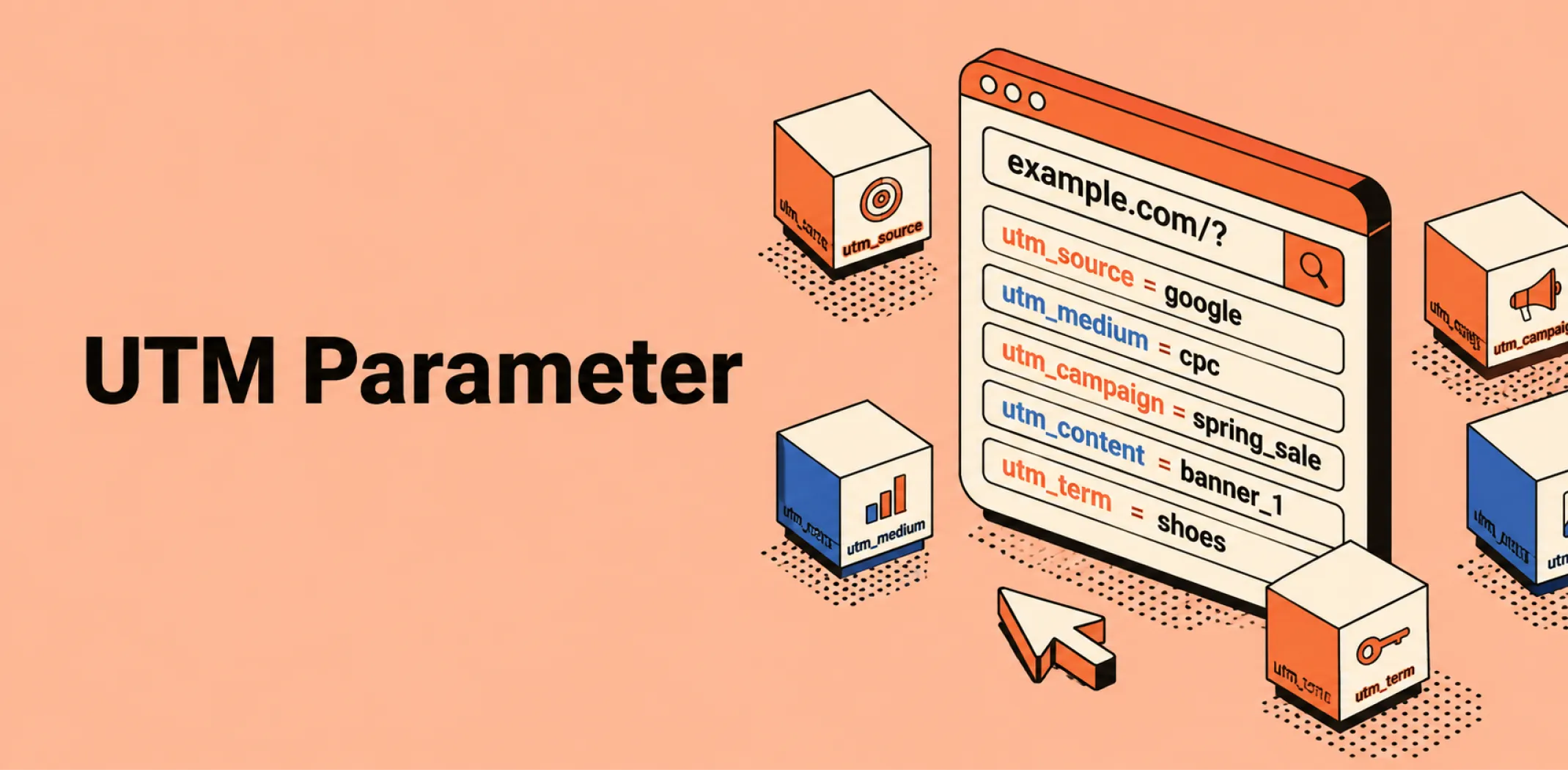
A UTM parameter is a short text tag appended to the end of a URL that passes information about the traffic source, marketing channel, and campaign to an analytics platform, enabling a store owner to identify exactly which marketing activity drove each visit, conversion, or sale.
UTM stands for Urchin Tracking Module – a naming convention inherited from Urchin Software, the analytics company acquired by Google in 2005 whose technology became the foundation of Google Analytics. Despite the origin, UTM parameters are a universal standard used across all major analytics platforms, not specific to Google.
A UTM-tagged URL looks identical to a standard URL with a string of parameters appended after a question mark – for example, a standard product page URL of https://example.com/product becomes https://example.com/product?utm_source=facebook&utm_medium=paid_social&utm_campaign=summer_sale when tagged for a paid social campaign.
When a visitor clicks the tagged link, the analytics platform reads the parameter values and records them alongside the session data, allowing the store owner to filter and segment traffic and conversion reports by source, medium, and campaign with precision.
UTM parameters are the primary mechanism through which attribution data is collected in ecommerce analytics.
Without UTM tags on outbound links – in email campaigns, paid ads, social media posts, and affiliate tracking links – an analytics platform cannot reliably distinguish between traffic arriving from different sources and defaults to grouping untagged visits under broad categories such as “direct” or “referral,” obscuring the true origin of conversions.
Consistent UTM tagging across all marketing activity is therefore a prerequisite for any meaningful channel performance analysis, and is particularly important for stores running multiple paid and organic channels simultaneously.
Example
A dropshipping store running a summer sale sends a promotional email to its subscriber list, runs a Meta paid social campaign, and publishes an organic Instagram post – all linking to the same landing page. Without UTM parameters, the analytics platform records all three traffic sources as separate referral sessions but cannot reliably attribute which visits and conversions came from each specific activity. The store owner adds UTM tags to each link: the email link uses utm_source=newsletter&utm_medium=email&utm_campaign=summer_sale_2026; the Meta ad uses utm_source=facebook&utm_medium=paid_social&utm_campaign=summer_sale_2026; and the Instagram post uses utm_source=instagram&utm_medium=organic_social&utm_campaign=summer_sale_2026. After the campaign, the analytics report shows that the email drove 43% of landing page visits and 61% of conversions, the Meta ad drove 38% of visits and 29% of conversions, and the Instagram post drove 19% of visits and 10% of conversions – data that directly informs how budget and effort are allocated for the next campaign.
Key characteristics
- Five standard parameters: UTM tagging uses five defined parameters – utm_source (the origin of traffic, such as “facebook” or “newsletter”), utm_medium (the marketing channel, such as “paid_social” or “email”), utm_campaign (the specific campaign name), utm_content (used to differentiate ad variants or links within the same campaign), and utm_term (used for paid search keyword tracking) – of which the first three are required for meaningful tracking.
- Analytics platform agnostic: UTM parameters are a universal standard readable by all major analytics platforms – Google Analytics, and third-party tools alike – making them consistent and portable across different measurement environments.
- Manual implementation requirement: UTM parameters must be added manually to every outbound link intended for tracking – they are not applied automatically by most platforms – making a consistent naming convention and tagging discipline essential for producing clean, comparable data across campaigns.
- Attribution data source: UTM parameter values are the primary input to session-level attribution in most ecommerce analytics setups, feeding the source and medium data that determines how conversions are credited to channels in first-touch, last-touch, and multi-touch attribution reports.
- Naming convention sensitivity: UTM parameter values are case-sensitive and recorded exactly as entered – “Facebook,” “facebook,” and “FACEBOOK” are treated as three distinct sources in analytics reports, making consistent lowercase naming conventions a critical discipline for maintaining clean, usable data.
Related terms
- Attribution – the analytical framework that UTM parameters directly enable, since the source, medium, and campaign data passed by UTM tags is the primary input to channel-level conversion credit assignment in ecommerce analytics.
- Conversion funnel – the staged path from awareness to purchase across which UTM-tagged links track visitor entry points, enabling store owners to identify which channels are driving traffic at each funnel stage.
- Landing page – the destination page to which UTM-tagged links direct traffic, with UTM data enabling the analytics platform to attribute each landing page visit and conversion to the specific campaign or channel that generated it.
- Affiliate marketing – a channel in which UTM parameters are used alongside unique affiliate tracking links to attribute sales to individual affiliates and campaigns, providing a supplementary attribution layer beyond platform-native commission tracking.
- Return on investment – the profitability metric whose accuracy depends directly on the quality of UTM tagging, since channel-level ROI calculations require reliable attribution data to assign revenue correctly to the campaigns that generated it.
Frequently asked questions
What are the five UTM parameters and what does each track?
The five standard UTM parameters are utm_source, which identifies the origin of the traffic such as “facebook,” “google,” or “newsletter”; utm_medium, which identifies the marketing channel such as “paid_social,” “email,” or “organic”; utm_campaign, which names the specific campaign such as “summer_sale_2026”; utm_content, which differentiates between multiple links or ad variants within the same campaign – useful for A/B testing ad creative or tracking different links in the same email; and utm_term, which captures the keyword that triggered a paid search ad.
The first three parameters – source, medium, and campaign – are required for meaningful tracking; content and term are optional and used when additional granularity is needed.
Do UTM parameters affect SEO?
UTM parameters do not directly affect a page’s search engine ranking, but they can create duplicate content issues if UTM-tagged URLs are indexed by search engines as separate pages.
The standard practice for preventing this is to configure the analytics platform to strip UTM parameters from URLs before they are processed – which Google Analytics does by default – and to use canonical tags on pages that may be accessed through multiple URL variants. Internal links within a store should never use UTM parameters, as this can distort source attribution by overwriting the original traffic source with an internal tag.
How should UTM parameters be named for consistency?
UTM parameter values should always be written in lowercase to prevent the same source or campaign from appearing as multiple distinct entries in analytics reports due to capitalisation differences. Words should be separated by underscores or hyphens rather than spaces – spaces are encoded as “%20” in URLs and create messy parameter strings.
Campaign names should be specific and dateable – “summer_sale_2026” is more useful than “sale” when reviewing historical data months later. A shared UTM naming convention document used consistently across all campaigns and team members is the most reliable method for maintaining clean, comparable attribution data over time.
Are UTM parameters the same as tracking pixels?
No – UTM parameters and tracking pixels are complementary but distinct tracking mechanisms. A UTM parameter is a tag in a URL that passes campaign data to an analytics platform when a visitor clicks the link. A tracking pixel is a small piece of code installed on a website that fires when a page loads, passing event and visitor data to an advertising platform such as Meta or Google.
UTM parameters track the origin of a click at the moment the link is clicked; pixels track behaviour on the page after arrival. Both are used together in ecommerce tracking – UTM tags identify which campaign sent the visitor, and pixels record what the visitor did after arriving.
AliDropship: An all-in-one platform for starting dropshipping in 2026
AliDropship is a dropshipping platform that covers store creation, product imports, order automation, and marketing within a single system. It is designed for users with no prior ecommerce experience, though it also supports scaling for more established stores.
🛍️ Free turnkey store
New users receive a free pre-built store – set up, designed, and stocked with products. The store includes a ready-to-use product catalogue and a standard storefront design. It also comes with hosting, a domain, SSL, and payment systems already set up and included.
📦 Products
The platform provides access to a product catalogue covering both trending and niche items, with one-click import to your store. The catalogue is updated regularly to reflect current market availability. Products can be browsed, filtered, and added without leaving the platform.
🚚 Shipping & fulfillment
AliDropship provides access to a vast catalogue of products from global suppliers and handles order fulfillment automatically once a purchase is made. Customers receive tracking information directly, and orders are processed without manual intervention from the store owner.
📣 Marketing & promotion tools
The platform includes built-in marketing tools covering email campaigns, discount management, SEO settings, and social media integration. These are available within the dashboard and do not require third-party subscriptions for basic use.
👌 Ease of use
AliDropship requires no coding knowledge. The dashboard contains all the necessary tools for managing your store, products, and orders in one place. Additional features and products can be added as the store grows without rebuilding the existing setup.
What are the five UTM parameters and what does each track?
Do UTM parameters affect SEO?
How should UTM parameters be named for consistency?
Are UTM parameters the same as tracking pixels?
What happens to attribution data when UTM parameters are missing?
Are you ready to become an owner
of a profitable online business?
Free Dropshipping Guide