How Does Shopify Work? A Complete Guide

If you have been thinking about starting an online store, you have almost certainly come across Shopify. It powers over 4.6 million active stores worldwide and is consistently ranked as the leading ecommerce store builder – but a lot of first-timers are still fuzzy on the details. Does it host your website? Handle payments? Do you need to know any code? Short answer: yes, yes, and absolutely not.
Quick Answer: Shopify is a subscription-based ecommerce platform that lets you build and run an online store without any coding experience. You choose a plan, add your products, connect a payment method, and start selling – Shopify manages hosting, checkout, and order processing behind the scenes.
This guide explains exactly how Shopify works in 2026 – from signing up and Shopify pricing to dropshipping, realistic earnings, and what beginners most often get wrong along the way.
Shopify has expanded significantly as a platform over the last few years, adding AI-powered features, faster checkouts, and deeper integrations with social commerce channels. Understanding how the pieces fit together before you invest time and money is the smartest first move you can make.

What is Shopify and how does the platform actually work?
Shopify is a cloud-based ecommerce platform that bundles everything a seller needs into a single monthly subscription. Rather than piecing together a separate website, payment processor, hosting provider, and shopping cart, Shopify handles all of it in one place. You log in through a browser or the Shopify mobile app, manage your products and orders from a central dashboard, and the platform takes care of the underlying infrastructure without you touching a line of code.
At its core, the platform works on a simple flow: you list products, a customer finds your store, adds something to their cart, and checks out. Shopify processes the payment, routes the order details to you or directly to your supplier if you are running a dropshipping operation, updates your inventory levels, and fires off an automatic order confirmation to the buyer. The whole operation runs from a laptop and a smartphone.
Shopify also connects to a large App Store – home to over 8,000 apps – that lets you layer in additional functionality as your business grows. Email marketing, loyalty programs, product reviews, upsells, and advanced analytics are all available as plug-in additions. Think of Shopify as a solid base layer you build on top of, rather than a finished product you switch on and walk away from.
Why this works in 2026: Global ecommerce revenue is projected to exceed $6 trillion in 2026, and Shopify continues to capture market share with faster native checkout flows, lower transaction fees for high-volume sellers, and improved AI tools that cut product description time significantly.
How much can you realistically earn with a Shopify store?
This is the question most people have before they commit, and the honest answer is: it varies enormously. A part-time dropshipping store run by a beginner might generate $200–$500/month after 60–90 days of consistent effort. A well-established niche store with tested products and a clear advertising strategy can reach $5,000–$15,000/month. The gap between those two figures is mostly time, testing, and consistency – not some secret formula.
Here is a realistic breakdown of what different Shopify store models tend to earn:
The table above reflects realistic ranges based on established stores – not what a beginner should expect in month one. Dropshipping is the most accessible entry point, but it requires active testing and consistent attention to margins. Private label offers higher profit per sale but demands a larger upfront investment in inventory and branding.
One note on the upper figures: Stores reaching $10,000+/month typically have 6–12 months of testing data behind them, proven winning products, and a defined advertising budget. For most beginners, a realistic first-quarter goal is $30–$80/day in revenue. Profitability depends on your margin per product – aim for at least 30% gross margin before ad spend.
“Full-time effort” in ecommerce means daily attention to product research, ad optimization, customer emails, and store improvements. It is closer to running a small business than earning passive income. That is not a reason to avoid it – it is just the realistic framing you need to plan around from the start.
How to set up a Shopify store – a step-by-step walkthrough for beginners
Learning how to set up a Shopify store is more straightforward than most beginners expect. The dashboard is well-organized, the onboarding flow is guided, and most of the decisions come down to product and design choices rather than technical ones. Here is how the process works from the very beginning.
Step 1 – Create your account and choose a plan
Signing up
Head to shopify.com and enter your email address. Shopify runs a short onboarding quiz asking about your business goals and prior experience – this helps it pre-configure your dashboard with the most relevant setup tasks. As of 2026, Shopify typically offers a 3-day free trial followed by a $1/month promotional period (often lasting 1–3 months) before your chosen plan starts at full price. That window is enough to build a complete store before spending anything meaningful.
Important: Your store is fully functional for building and testing during the trial period – but customers cannot complete purchases until you activate a paid plan and connect a payment provider. Do not run traffic to your store before that step is complete.
Choosing your plan
For most Shopify beginners, the Basic plan ($39/month billed monthly, or around $29/month on annual billing) is the right starting point. It covers unlimited product listings, two staff accounts, basic reporting, and access to Shopify Payments – which removes the additional 2% third-party transaction fee. The Shopify plan ($105/month) unlocks professional reports and lower card processing rates, which becomes relevant once you are processing higher volumes. Advanced ($399/month) is built for established stores with complex analytics needs.
Step 2 – Build your storefront
Picking a theme
Shopify’s Theme Store offers around 12 free themes and 80+ premium paid options. The free themes – particularly Dawn, Refresh, and Sense – are clean, mobile-first, and built to convert. Paid themes range from $180–$380 and add features like mega navigation menus, video backgrounds, and advanced product filtering. For most new stores, starting with a free theme is the smarter decision. You can always swap to a paid theme later without losing your products or content structure.
Adding your products
Products are added through the Products section of the Shopify dashboard. For each listing, you upload images, write a product description, set a price, add variants like sizes and colors, and configure inventory tracking. If you are running a Shopify dropshipping store, apps like DSers or AutoDS connect your store directly to AliExpress suppliers and pull product listings in automatically – including images, descriptions, and base pricing. You set your own retail price on top of the supplier cost and keep the difference as margin.
Earning potential: Product pages with at least 5 high-quality images and a description that addresses common customer objections typically convert at 2–4x the rate of basic listings with a single photo and a short title.
Setting up payments and checkout
Shopify Payments is the native payment option and the simplest to activate – it supports major credit and debit cards, Apple Pay, Google Pay, and Shop Pay, and does not charge an extra transaction fee on qualifying plans. If your country does not support Shopify Payments (available in approximately 20 countries as of 2026), you can connect PayPal, Stripe, or one of over 100 third-party gateways instead. Note that using a non-native gateway on the Basic plan adds a 2% transaction fee per sale on top of your payment processor’s own rates.
Shopify pricing – what does it actually cost to run a store?
Shopify pricing is one of the most searched sub-topics around this platform for good reason – the monthly plan fee is only one part of the total cost picture. Understanding the full structure before you launch is how you avoid building a store that is busy but not profitable.
Here is an honest breakdown for a beginner store on the Basic plan in 2026:
- Basic plan: $39/month (or ~$29/month on annual billing)
- Custom domain: $14–$20/year (roughly $1.50/month)
- Apps: $0–$50+/month depending on what you install
- Transaction fees: 0% with Shopify Payments; 2% per sale with a third-party gateway
- Paid theme: Optional, $180–$380 as a one-time cost
- Ad spend: Variable – most beginners start at $5–$20/day on Meta or TikTok Ads
A lean starter store running on the Basic plan with a free theme, a domain, and two essential apps costs roughly $45–$65/month in fixed overhead before any advertising. That is the realistic floor. As you scale and add functionality, those costs rise – which is why tracking cost-per-acquisition from the very first sale matters as much as revenue.
Important note: Shopify pricing changes periodically. Always verify current plan rates directly at shopify.com before making a decision – the figures above reflect the pricing structure as of early 2026.
One thing many beginners underestimate is app accumulation – the gradual layering of paid apps that each seem minor ($9/month, $14/month, $19/month) but add up to $60–$100/month or more before you realize it. Before installing a paid app, ask whether it solves a problem you already have or one you might have some day. Only pay for what is actively contributing to your revenue.
Shopify dropshipping – how it works and what to realistically expect
Shopify dropshipping is the most popular model for beginners learning how to use Shopify, and it is easy to understand why. You do not hold inventory upfront, you do not handle shipping, and your starting costs are low. When a customer orders from your store, the request routes to your supplier, who packs and ships the product directly to the buyer – often without any branding that reveals the supplier’s identity. You keep the margin between what your customer pays and what the supplier charges.
How dropshipping connects to the Shopify platform
The most common setup uses Shopify as the storefront connected to AliExpress suppliers through a fulfillment app. DSers, AutoDS, and Zendrop are the most widely used in 2026. Once connected, you browse supplier catalogs, import products into your store in one click, and the app handles order routing automatically when a sale comes in. You can run this operation entirely from a laptop – no warehouse, no packing materials, and no minimum order quantity requirements.
The main trade-off is thinner margins and longer delivery windows compared to holding your own inventory. AliExpress shipping to the US or UK typically takes 7–20 days, which is acceptable to many buyers as long as your store is transparent about it upfront. Being clear about shipping timelines in your product descriptions and at checkout significantly reduces disputes and chargebacks down the line.
What to realistically expect in your first 90 days
Most new Shopify dropshipping stores take 30–60 days to generate their first sale. This is not because the model is flawed – it is because product testing, ad creative development, and audience targeting take time to dial in. Stores that launch with one product and no paid traffic tend to wait longer. Stores that start with a small daily ad budget of $5–$15/day, test 3–5 products at once, and adjust based on data find traction faster.
By month three, a store with consistent daily attention should be generating $200–$800/month in revenue. Profitability depends on your gross margin per product – aim for at least 30–40% before ad costs – and how efficiently you are acquiring customers. The stores that cross $1,000/month have typically identified one or two strong products and doubled down on them rather than spreading effort across dozens of untested listings.
Earning potential: A focused Shopify dropshipping store with a defined niche and a modest ad budget can reach $500–$2,000/month in revenue within 90 days of consistent testing and optimization.
Legal and ethical considerations when you sell online with Shopify
Running an ecommerce store comes with legal obligations that are easy to overlook when you are focused on products and traffic. Getting these right from the start protects your store, your payment accounts, and your long-term reputation.
Key principle: Transparency with customers is a legal requirement in most markets – not just a best practice. Stores that obscure return policies, misrepresent shipping timelines, or use deceptive pricing face chargebacks, account suspensions, and in some cases consumer protection fines.
Here is what every new Shopify seller should address before launch:
- Return and refund policy: Shopify includes a built-in policy generator – use it, but read the output carefully and customize it to match your actual process. A policy that promises 30-day returns when your supplier does not accept them will create serious friction quickly.
- Accurate shipping disclosures: If your products ship from overseas and take 15–25 days to arrive, state that clearly on the product page and at checkout. Hiding delivery times to appear more competitive is one of the top causes of disputes among new stores.
- Counterfeit and branded goods: Selling items that carry trademarks you have no rights to – whether a designer logo or a well-known licensed character – is a fast route to a Shopify store suspension and a frozen payment account.
- Data privacy compliance: Selling to EU customers means GDPR applies. California customers bring CCPA obligations. At minimum you need a cookie consent notice, a privacy policy, and a clear explanation of how customer data is used and stored.
Important: Purchasing fake reviews violates Shopify’s terms of service, the FTC’s endorsement guidelines in the US, and the UK’s Consumer Protection from Unfair Trading Regulations. The short-term credibility boost is not worth losing your store or your payment processing account over.
The better alternative is a post-purchase email sequence. Shopify Email, included free on all plans, lets you send automated follow-up messages 7–10 days after expected delivery asking buyers for honest feedback. A steady flow of real reviews builds more durable trust than any purchased batch ever could.
Final thoughts – which Shopify path fits your situation?
Shopify is a capable platform that genuinely works for online selling – but the right approach depends entirely on where you are starting from and what you are willing to commit. Here is a clear breakdown by reader profile to help you figure out your first real move.
Complete beginner
If you are new to ecommerce and trying to understand how Shopify works before spending money, start with the $1/month trial and spend your first week exploring the dashboard without pressure. Build a test store around one product category, go through the full checkout flow as a customer, and connect a test payment account to see how orders process. Do not pay for apps or premium themes until you understand what you actually need. The goal for month one is not revenue – it is deep platform familiarity so that every decision you make afterward is an informed one.
Intermediate / part-time
If you have some digital marketing experience or have dabbled in online selling before, Shopify dropshipping is a solid model for building reliable side income. Focus on a specific niche rather than a general product mix, set a testing budget of $50–$100/month for paid ads, and treat it as a 6-month project minimum. Consistent part-time effort at this level realistically produces $300–$800/month after 90–120 days of active iteration and product testing.
Advanced / full-time goal
If replacing a salary with ecommerce income is your goal, plan for a 9–12 month runway before hitting full-time revenue levels consistently. That means running the store like a business: weekly financial reviews, systematic product testing, defined customer profiles, and reinvesting profit into what is already working. Stores that reach $5,000–$10,000/month in profit typically operate with 3–5 proven winning products, a reliable fulfillment setup, and a clear paid or content-driven traffic strategy. It is absolutely achievable in 2026 – but it requires treating it as a primary focus, not a background experiment.
Ecommerce continues to grow as consumer spending shifts further online, and platforms like Shopify keep lowering the barrier to entry with better automation and faster store setups. The window to build something real remains wide open this year.
AliDropship: Your complete all-in-one solution for starting dropshipping in 2026
If you want the simplest possible way to start dropshipping – especially if you’re brand new – AliDropship remains one of the most beginner-friendly tools available in 2026. It brings together store creation, product imports, automation, and marketing into a single streamlined system designed to help you launch quickly and grow confidently.
Free turnkey store 🛍️
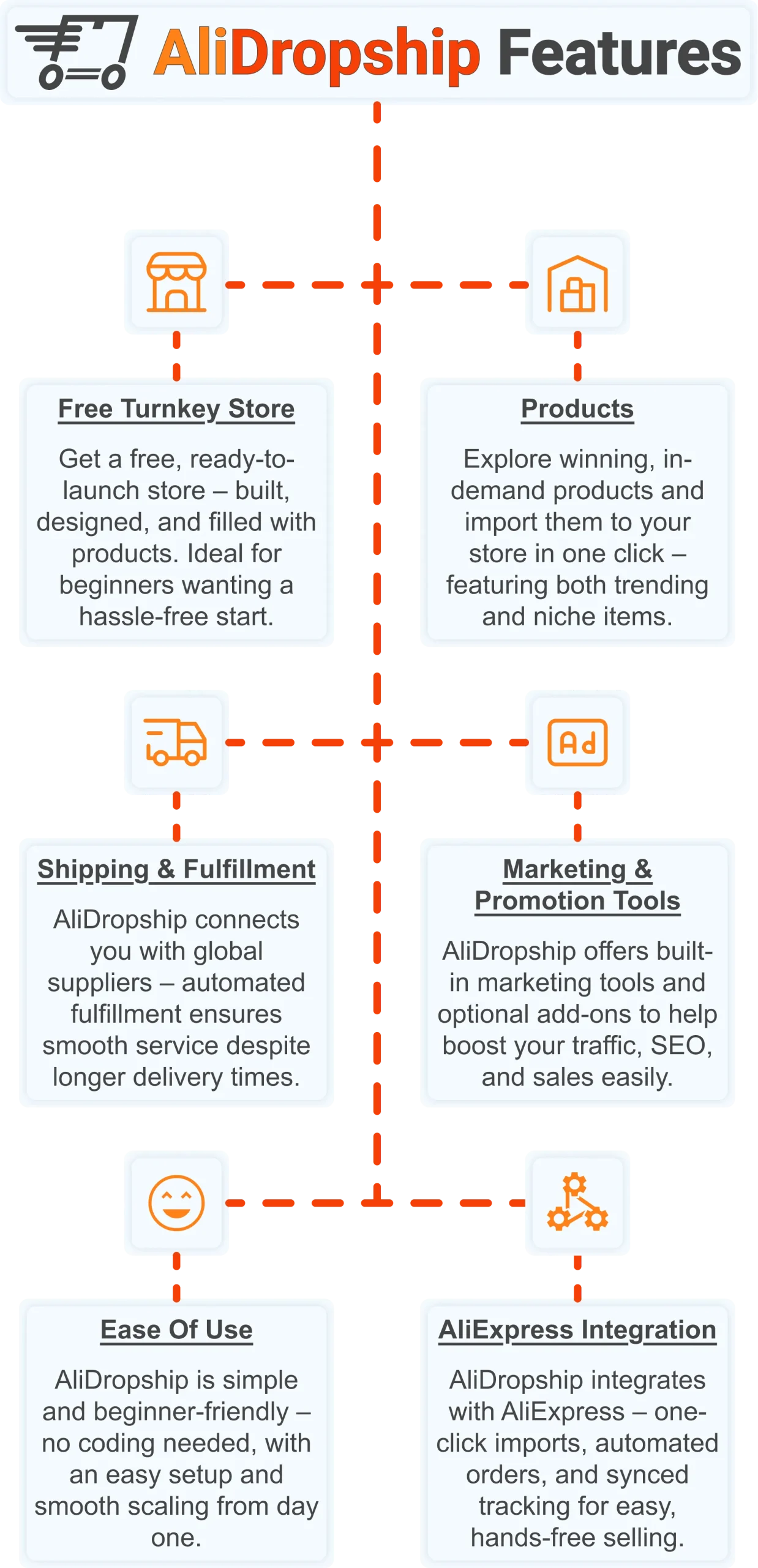
Get a free turnkey store – built, designed, and filled with products. Ideal for beginners wanting a hassle-free start, the store comes fully optimized to attract customers right away, saving you time on setup. Plus, it includes professional design elements to give your business a polished, trustworthy look from day one. This ready-made foundation makes it easy to move seamlessly into product selection.
Products 📦
Once your store is set up, you can explore winning, in-demand products and import them in one click – featuring both trending and niche items. This wide selection lets you cater to diverse customer interests and test what works best. Regular updates ensure you always have fresh products, keeping your store competitive and relevant. With great products in place, smooth shipping becomes the next essential step.
Shipping & fulfillment 🚚
AliDropship connects you with global suppliers, and automated fulfillment ensures seamless order processing despite international delivery times. Customers receive real-time tracking updates, which builds confidence and trust in your store. Once shipping is handled reliably, you can focus on promoting your store and attracting traffic.
Marketing & promotion tools 📣
To maximize sales, AliDropship offers built-in marketing tools and optional add-ons that help boost traffic, SEO, and conversions. From email campaigns and discounts to social media integration, these tools empower you to reach and retain customers without needing prior marketing experience. With promotion strategies in place, managing your business becomes simpler and more efficient.
Ease of use 👌
AliDropship is beginner-friendly – no coding needed, with an intuitive dashboard that guides you through every step. Easy setup and smooth scaling let you expand your store without stress. As your business grows, adding new features, products, and marketing campaigns remains hassle-free, giving you more time to focus on sales.
AliExpress integration 🛒
Finally, AliDropship integrates seamlessly with AliExpress, enabling one-click imports, automated orders, and synced tracking. Your inventory stays up-to-date with the latest products and prices, while automated order processing frees you from manual tasks. Combined with the turnkey setup, reliable shipping, and built-in marketing tools, this integration ensures your dropshipping business is fully equipped for growth and success.
Understanding how Shopify works is the first step – taking action is what separates people who research from people who earn. Get your free AliDropship store today and start selling without the monthly subscription.
How does Shopify work for beginners?
Is Shopify good for dropshipping?
How much does Shopify cost per month?
How long does it take to make money on Shopify?
Does Shopify handle payments and shipping?